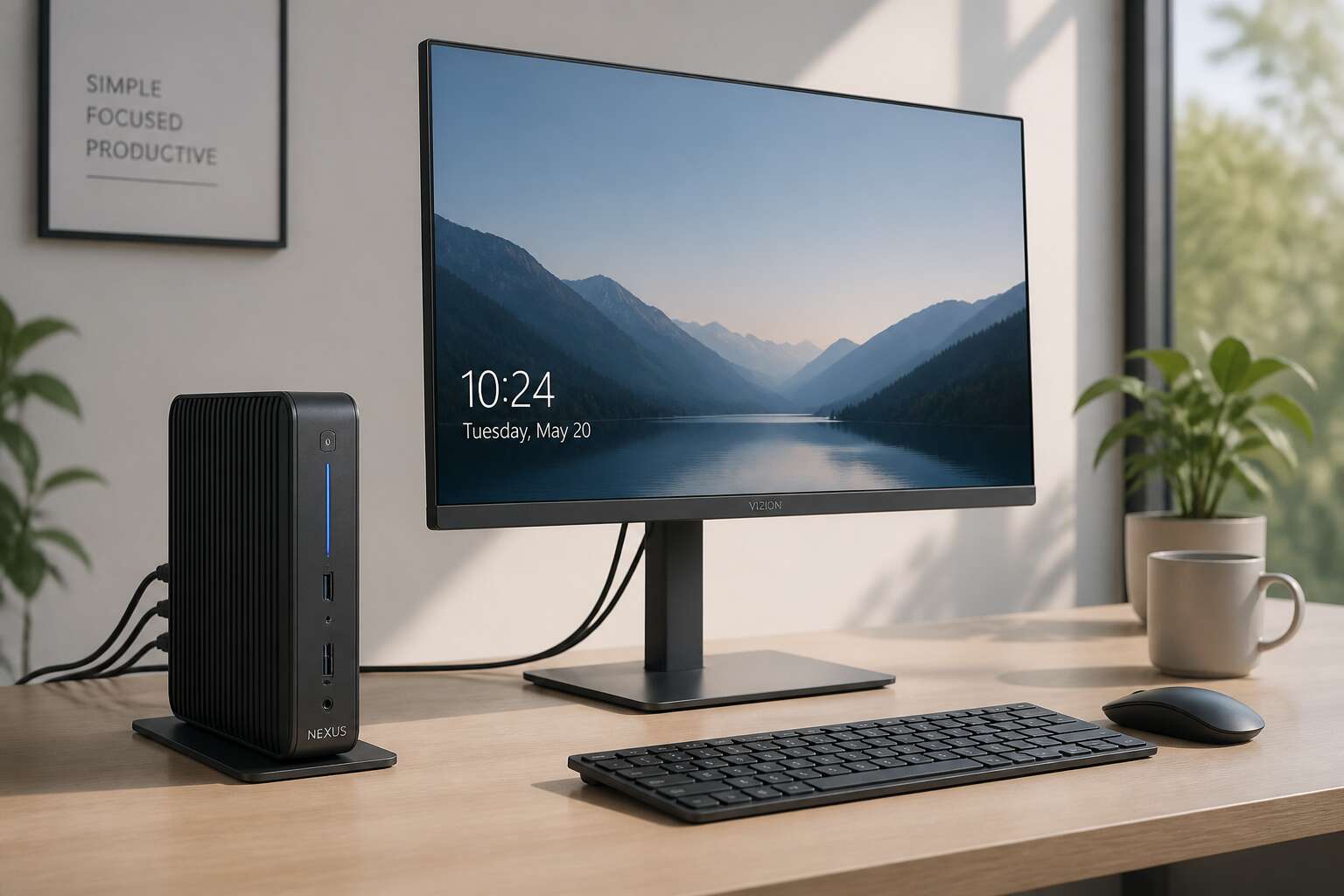
Understanding the Integrated Workspace Concept
Benefits of Combining Processing Power and Display
South African offices lose real money to the invisible gap between a CPU and its screen. The integrated workspace concept shortens that gap. A thin client with monitor fuses processing power and display into a single physical entity, eliminating the silent delays of separate devices. The benefit is immediate: lower energy consumption and reduced hardware clutter!
This convergence also alters the user’s relationship with the tool. In my experience, the processing unit sits directly behind the screen, not in a box under the desk, which shortens the path for every instruction.
- Fewer failure points, since one unit replaces dual components.
- Faster troubleshooting, as symptom and cause share a chassis.
- Simpler lifecycle management, because upgrades target one product.
For businesses facing load-shedding, this is a pragmatic shift. The workspace becomes a single coherent system, free from mismatched components.
How Integrated Units Differ from Traditional Desktop Towers
A decade of corporate IT left South African offices with a silent architecture: the tower beneath the desk, sealed, dusty, humming in the half-light. The monitor above, silent and separate. I have walked past this arrangement daily.
The integrated workspace concept refuses that separation. The thin client with monitor stands as one declared presence on the desk. One chassis. One serial number. One object that answers for every operation.
Consider what changes when the unit sits in the open rather than under your knees:
- Temperature, noise, and activity become visible, not abstract reports from a distant cabinet.
- Physical security simplifies, since the device cannot vanish into cable tangles.
- A technician inspects the entire workspace without crawling beneath furniture.
This rearrangement carries real weight. The tower stayed in the shadows. The thin client with monitor enters the room.
Primary Use Cases in Modern Office Environments
In a Gqeberha call centre, the noise level dropped after the switch. A thin client with monitor changed more than the hardware. It changed the room. The integrated workspace concept does not decorate a desk. It redefines the workflow.
Primary use cases in modern office environments show this clearly. A multi-channel support desk needs one persistent session across shifts. A hospital reception needs a sealed unit that wipes clean in seconds. A factory floor needs a display that survives dust. Each environment adopts the same compact form, and the advantage is operational rhythm. I have watched supervisors walk lines of desks, reading every screen without opening a single cabinet. That visibility is the true asset.
Evaluating Hardware Limitations for Task-Specific Workloads
The integrated workspace concept demands honesty. A thin client with monitor removes the tower under the desk, leaving a tool that must be matched to its task. Hardware limitations surface only when workloads exceed the endpoint’s capacity. A financial analyst running multiple spreadsheets needs different resources than a warehouse clerk scanning barcodes. The most frequent failure I observe is not the hardware itself. It is the assumption that every desk deserves the same endpoint.
Evaluating these limitations requires a clear view of daily operations:
- Concurrent applications running in the session
- Peripheral devices drawing power and bandwidth
- Network latency between the endpoint and the server
Each factor determines whether the thin client with monitor performs or stutters.
In South Africa, where load shedding interrupts the workday, an efficient workstation draws less power and survives on battery backup longer. Matching hardware to the workload is not a technical formality. It is respect for the operator who depends on the machine.
Essential Features to Evaluate Before Committing
Screen Size, Resolution, and Panel Technology
The average office worker shifts between applications more than 1,100 times daily. The display paired with a thin client with monitor therefore determines daily endurance, not marginal comfort. Screen size governs how much spreadsheet or coding canvas stays visible without endless scrolling. Resolution sharpens the image, but panel technology decides colour accuracy and viewing angles.
South African offices contend with strong ambient light. Choosing the right panel involves trade-offs:
- IPS panels maintain colour when viewed from the side, useful for collaborative desks.
- VA panels deliver deeper blacks for financial models and dashboards.
- TN panels respond quickly but wash out at angles, acceptable for basic entry tasks.
Distance also matters. A 24 inch screen suits 1080p. A 27 inch screen demands 1440p to preserve pixel density. Get these choices right, and the thin client with monitor enables focused work without visual fatigue.
Processor, Memory, and Storage Configurations
What matters is not the speed of a single benchmark, but how the processor, memory, and storage behave as one living system. I have seen a thin client with monitor stall not because the CPU was weak, but because the storage choked under constant read and write pressure. That is the quiet failure nobody anticipates.
For South African teams, the real test is everyday multitasking. Consider the memory ceiling first. Then examine the storage type, because an SSD transforms responsiveness more than any other single upgrade. For example, a 4GB unit handles one application gracefully, but eight hours of browser tabs and remote sessions demand 8GB or more.
- Processor generation determines instruction efficiency, not just clock speed.
- Storage endurance matters in warm climates, so check the rated lifespan.
Choose configurations that leave headroom. A thin client with monitor should feel effortless on ordinary days, not merely survive them.
Connectivity Ports and Wireless Standards
The quietest failure in a thin client with monitor is not the processor. It is the port you discover is missing after deployment. In South African offices, where network infrastructure varies dramatically, connectivity determines whether a unit becomes a tool or a paperweight.
Consider the practical demands. A unit with only two USB ports will frustrate a user juggling a keyboard, mouse, and smart card reader. Wireless standards matter equally. Older Wi-Fi 5 adapters struggle in buildings with dense concrete walls, common in local office parks. The port layout dictates the workflow:
- USB ports determine peripheral capacity
- Wireless standard determines roaming reliability
- Video outputs determine display compatibility
Ethernet remains the reliable backbone. A thin client with monitor should offer gigabit LAN, not a legacy 100Mb port. That single detail saves countless support tickets.
Ergonomic Adjustability and VESA Mounting Options
Workers change postures roughly every fifteen minutes, whether they realise it or not. A static monitor stand ignores this rhythm. Ergonomic adjustability in a thin client with monitor should offer more than a token tilt. Height adjustments matter most, followed by swivel for shared screens. Pivot options help those who read documents in portrait orientation. VESA mounting takes this further by decoupling the display from the desktop. A thin client with monitor equipped with standard mounting holes connects to arms, brackets, or rails. Consider the common patterns:
- 100x100mm for most 20 to 27 inch displays
- 75x75mm for smaller compact units
- Proprietary mounts for specialised furniture
Each pattern changes how the user interacts with space. In South African offices, where a reception desk may double as a workstation, the ability to raise or swing the screen away is not luxury. It is practical decency.
Energy Consumption and Long-Term Operating Costs
Energy consumption often decides the true cost of a thin client with monitor. The display panel draws more power than the computing unit itself. LED backlights have improved efficiency, but screen size and brightness still govern the draw. A 24 inch monitor at full brightness may use 30 watts. The thin client might sip only 10 to 15 watts under load. Over a year of eight hour workdays, that difference accumulates.
South African offices face rising electricity tariffs and load shedding. Every watt matters when backup batteries must sustain a workstation. Lower power consumption extends runtime on inverters and UPS units. It also reduces heat output, easing the burden on air conditioning.
When evaluating long term costs, examine:
– Rated power consumption under typical workloads
– Energy efficiency certifications
– Power management features like automatic sleep modes
A thin client with monitor that manages power well lowers the total cost of ownership. The purchase price is only the beginning. Operating costs continue for years, making efficiency a critical evaluation point.
Security Features and BIOS-Level Protections
Security in South African offices is no longer an afterthought. The centralised nature of a thin client with monitor means data rarely resides on the endpoint itself, but the device still represents a gateway into your network. BIOS-level protections deserve scrutiny before you commit to a fleet.
Look for features like secure boot, firmware TPM integration, and write-protected storage. These controls prevent unauthorised firmware modifications and credential theft. Also verify that the vendor delivers timely BIOS patches, since vulnerabilities in the firmware layer can compromise every machine on the floor.
- TPM 2.0 support for full disk encryption keys
- Secure boot to block unsigned bootloaders
- BIOS password and administrative lockout controls
- Remote management for firmware updates
Without these capabilities, the thin client with monitor becomes the weakest link in an otherwise secure infrastructure.
Matching Deployment Scenarios to Business Needs
Virtual Desktop Infrastructure Readiness and Protocol Support
The quiet failure of a deployment rarely announces itself. It emerges during peak login hours, when the thin client with monitor sits helpless before a strained virtual desktop infrastructure. Readiness is not a certificate. It is a living condition of the network.
Protocol support carries the weight of that condition. RDP suits sprawling office tasks. PCoIP handles graphics-heavy sessions. Blast adapts to modern cloud environments.
- Latency tolerance differs across RDP, PCoIP, and Blast.
- Bandwidth consumption varies with each protocol’s compression.
- Authentication overhead can stall concurrent connections.
I have watched business needs outpace the chosen protocol. The thin client with monitor stayed silent, not from defect, but from a mismatched pairing between what the infrastructure offered and what the workload demanded.
Call Centers and High-Density Task Workstations
Call centers operate on predictability. Every agent needs the same applications, the same access rights, and the same session quality. A thin client with monitor in this environment replaces the variable of desktop failure with a fixed, manageable endpoint. The hardware does not store data. It only renders what the server sends.
High-density task workstations follow a different rhythm. Data entry floors, claims processing, and dispatch operations all share one narrow, relentless workload. Here, selecting a thin client with monitor affects floor space, power draw, and heat output as much as it affects performance.
Consider the ratio of users to physical machines:
- One workstation per employee with dedicated login
- Shared desks across shift rotations
- Overflow seats for surge staffing
Each scenario changes the memory footprint and network load, so match the unit to the actual shift pattern, not the job title.
Healthcare, Finance, and Privacy-Sensitive Industries
Healthcare and finance demand stricter controls. A consultation ends, a trade settles, and the session must vanish without residue. The thin client with monitor in these settings is not chosen for speed or screen quality. It is chosen because it leaks nothing. The server holds the record, the display shows it, and the local device retains zero trace. From my audits, violations surface there.
Privacy-sensitive industries in South Africa face POPIA audits demanding proof of controlled access. The workflow determines the count. A four-room clinic may need two units if nurses triage before doctors arrive. A brokerage may require one unit per desk but none for the back office.
- Simultaneous shift handovers where logout must be instant
- Locations where data residency is a regulatory condition
- Environments where staff turnover makes credential management constant
Deploying a thin client with monitor rests on the audit trail, not the headcount.
Education, Libraries, and Public Kiosk Settings
Twenty learners rotate through one station between classes. That churn demands more than a durable screen. A thin client with monitor handles the rotation without storing a single profile locally. Each user logs in, works, and vanishes. No cached files. No lingering credentials.
Public kiosks follow the same logic. A visitor checks a catalogue, prints a form, or submits a query. The next person should inherit a blank slate. The thin client with monitor makes that reset automatic.
What matters in these shared environments:
– Centralised software updates across dozens of units
– Peripheral support for card readers and receipt printers
– Tamper-resistant casing that survives heavy handling
The device stays an endpoint. The real processing happens elsewhere. That separation keeps education and library networks predictable, even under constant use.
Home Office and Hybrid Work Configurations
The hybrid work wave has quietly redrawn how South Africans inhabit their homes. I have watched colleagues turn spare bedrooms into command centres, yet most still cling to bulky towers that groan through load shedding. A thin client with monitor alters that equation entirely. Your desktop lives in the cloud, not under your desk!
For those splitting time between office and home, the thin client with monitor delivers reassuring consistency. One device at each location. The same virtual workspace. No synchronising files. No waiting for updates.
Consider what a home setup truly demands:
– Reliable connectivity for remote desktop protocols
– Low power draw during extended Eskom outages
– Compact footprint for smaller living spaces
The device itself becomes unobtrusive. That is the triumph. Your work follows you, while the hardware stays out of the way.
Managing Performance and Lifecycle Operations
Centralized Endpoint Management and Group Policies
Managing performance across a fleet of devices becomes less about individual troubleshooting and more about policy enforcement. A thin client with monitor operates as a managed endpoint, receiving its configuration from a central controller. Software updates, security patches, and user permissions flow from one source, so no one has to touch each unit by hand.
Group policies give administrators the ability to define which resources are accessible at specific times or for specific roles. Performance baselines can be set and monitored remotely, and underperforming units are flagged before they become a problem. Lifecycle operations, from provisioning to retirement, follow the same process.
Consider what the central management layer handles:
- Rolling out firmware updates across all devices at once
- Applying user specific policy settings without physical access
- Restoring a replacement thin client with monitor to its intended state
Because the operating system and applications reside on the server, a failed unit is swapped without data recovery. The monitor becomes a display surface, while governance remains centralised, predictable, and repeatable.
Firmware Updates, Patching, and Remote Troubleshooting
Firmware updates on a thin client with monitor arrive through the same central channel that governs the rest of the estate. No trolley rounds from desk to desk! The update queue is managed from one screen, and each unit receives its patch in sequence.
Remote troubleshooting follows a similar rhythm. When a unit behaves oddly, the administrator opens a session directly on the endpoint, sees what the user sees, and adjusts the configuration in real time. Physical intervention stays rare.
A practical workflow might look like this:
- Receive a firmware notification and review its compatibility notes
- Schedule the rollout across a maintenance window
- Monitor telemetry for a day after deployment
- Flag any anomalies and roll back the specific unit
Patching cadence matters. A thin client with monitor that runs older firmware may still function, but it drifts from the baseline. That drift is what creates inconsistent experiences across a workforce.
Peripheral Compatibility and Multi-Display Extensions
A thin client with monitor ages on its own schedule! The display panel outlasts the computing module. Peripheral compatibility becomes a concern. Legacy printers, smart card readers, and biometric scanners need driver support inside the endpoint OS. Test devices against the image before rollout, or the helpdesk inherits a chain of exceptions.
Multi-display extensions change the workflow. One thin client with monitor can drive two or three screens through DisplayPort or HDMI. This matters for traders and finance teams. Enough frame buffer memory is essential. Protocols cap the resolution per display, so verify the virtual desktop settings.
The administrator confirms a few things before deployment:
- graphics protocol support for the number of displays
- total bandwidth across all connected monitors
- power delivery to peripherals through the USB ports
Lifecycle planning follows the refresh cycle of the thin client, not the monitor. At end of life, the display is reused with the next unit.
Optimizing Network and Session Performance
Network latency shapes the user experience more than the desktop hardware. A thin client with monitor can feel sluggish when the session protocol contends for bandwidth. Optimize the virtual channel settings and enable compression only when the link demands it. Audio and USB redirection consume overhead, so disable unused features.
Lifecycle operations follow a predictable rhythm. Monitor the firmware versions and match them to the host infrastructure. When the endpoint pool scales, session performance degrades if the connection broker lacks headroom. The following checks keep the fleet stable:
- Validate the protocol’s adaptive bitrate behavior
- Confirm that gateway capacity supports the peak login window
- Track round-trip time between the client and the virtual desktop
A thin client with monitor ages independently. The display stays useful long after the compute module reaches obsolescence. Plan the replacement cycle around the endpoint, not the screen. Keep the network path clean, and the session stays responsive.
Scaling from Small Pilot to Full Organizational Rollout
A pilot deployment of a thin client with monitor conceals the friction that emerges at scale. The first fifty units receive personal attention. The next five hundred demand structure. I have watched endpoint inventory, firmware versions, and support tickets multiply faster than the team grows.
The rollout exposes patterns the pilot never showed:
- Images drift when each site configures its own baseline
- Replacement triggers remain tied to the display, not the endpoint
- Session behaviour shifts as the login load accumulates
A thin client with monitor outlasts its compute module. The display stays viable long after the endpoint reaches obsolescence. Plan the replacement cycle around the infrastructure roadmap, not the screen’s condition. Consistent endpoint baselines keep the lifecycle predictable.
Future-Proofing with Emerging Alternatives
The Shift Toward Cloud PCs and Desktop-as-a-Service
By 2025, Gartner predicts that 60% of enterprises will adopt Desktop-as-a-Service, a marked departure from traditional endpoint ownership. The thin client with monitor is no longer a static peripheral, but a portal to fluid, cloud-hosted workspaces. Cloud PCs decouple the session from local hardware, allowing hardware to outlast software generations.
This shift redefines procurement cycles. Instead of replacing units every few years, organisations can extend the lifespan of their existing thin client with monitor setups, since processing occurs remotely. Emerging alternatives like Windows 365 and Azure Virtual Desktop offer granular scaling. Consider what future-proofing truly demands:
- Elastic compute resources that match fluctuating workforce sizes
- Centralised disaster recovery without per-device configuration
- Subscription models that convert capital expenditure to operational costs
Adopting DaaS changes the risk calculus. Hardware becomes secondary to network reliability, and the endpoint serves simply as a resilient window into an evolving cloud environment.
Zero Client Architecture vs. Traditional Thin Client Models
A zero client has no operating system to patch, no local storage to fail, and no boot cycle. Traditional thin client models retain an embedded OS, which gives them flexibility for local peripherals and offline sessions. The trade-off is lifecycle length. A zero client with no local state rarely becomes obsolete, because its only job is to negotiate a connection.
The thin client with monitor still carries firmware and configuration overhead, meaning patches and compatibility checks. For organisations planning around cloud PC rollouts, zero clients offer a cleaner hardware baseline. The thin client with monitor setup remains useful when specific legacy peripherals or local video decoding are required. Compare the two:
- Zero client: stateless, longer hardware relevance, strict network dependency
- Traditional thin client: local USB mapping, offline readiness, more endpoint support
Both architectures support virtual desktop protocols. The deciding factor is your tolerance for endpoint maintenance, not sticker price.
Display Technology Advances and Integrated Touch Capabilities
The last component you upgrade should be the one you look at all day. Display technology has advanced faster than the compute modules that feed it. A thin client with monitor that supports accurate colour and smooth refresh rates remains relevant long after the zero client or traditional endpoint has been replaced.
Integrated touch capabilities change the interaction model entirely. You tap, swipe, and annotate without reaching for a keyboard or mouse. In shared South African workspaces, where high-density task stations rotate between staff, this eases transitions between users. I have seen touch interfaces outlive three firmware generations without complaint.
Emerging panel alternatives to consider:
- OLED with per-pixel dimming for deeper blacks
- mini-LED for localised backlight control
- higher refresh rates for reduced eye strain
These consume less power and produce less heat. Both matter where energy costs climb yearly. The monitor provides the longest service life across changing endpoint hardware.
Sustainability, Repairability, and E-Waste Reduction
The longevity of a thin client with monitor depends on how easily it can be serviced. Screws instead of glue, standardised components, and accessible ports extend useful life. When a power supply fails, replacement should take minutes, not require a new unit.
E-waste reduction starts with choosing hardware that can be upgraded incrementally. South African organisations face rising disposal costs and tighter environmental regulations. A modular design reduces landfill contribution and lowers total cost of ownership.
Consider these repairability features:
- Tool-less chassis access
- Standardised RAM and storage slots
- Replaceable panel and backlight units
Repairable designs resist planned obsolescence. They keep valuable materials in circulation. This approach matters when procurement budgets must stretch further each cycle.
Comparing All-in-One Units with Separate Components
Procurement decisions in South Africa often hinge on how tomorrow’s upgrades will unfold. A thin client with monitor built as a single unit offers clean aesthetics, but separate components grant greater escape routes when technology shifts.
Emerging alternatives, such as repurposed endpoints or modular boxes, thrive on interchangeability. Imagine replacing only the display for a higher refresh rate while keeping the compute module intact! That approach reduces waste and aligns with tightening environmental rules.
- All-in-one units consolidate footprint, yet they couple your screen’s fate to the internal processor.
- Separate components let you scale storage or memory without discarding a working panel.
From my experience, separating these parts gives South African IT teams the agility to test new protocols without overhauling entire desks.

0 Comments