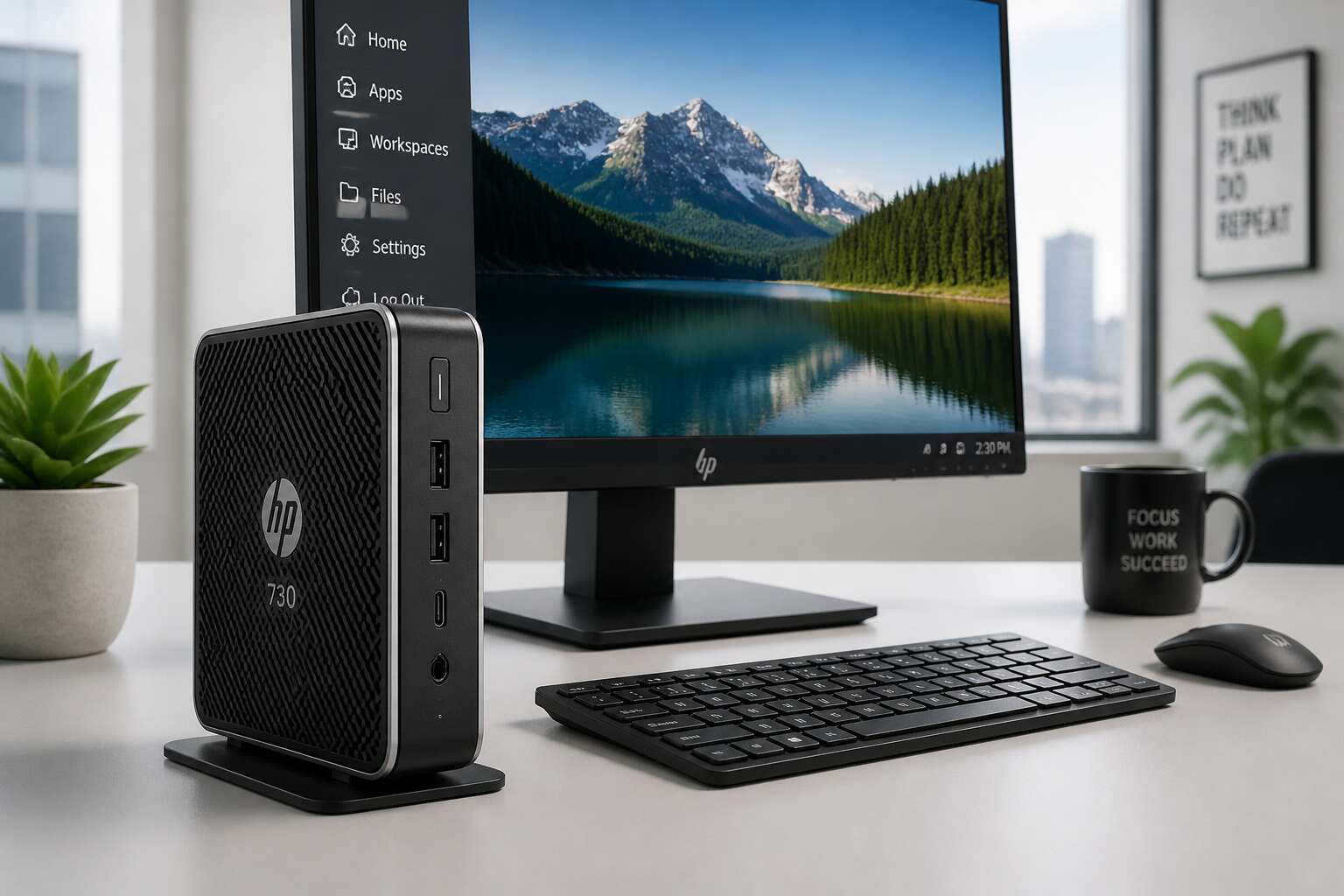
Evaluating the HP 730 as a Strategic Endpoint
What Makes the HP 730 a Smart Investment for VDI
Ask an IT manager in Cape Town about VDI headaches, and the talk moves to endpoints. The thin client HP 730 changes that conversation. It brings dual 4K output, a fanless chassis, and manageability that cuts onsite visits.
For a strategic endpoint, we look at lifecycle cost, security posture, and user experience. The thin client HP 730 scores on all three. Its firmware is locked down, and the device boots straight to your virtual workspace with no local data residency. That matters in a country with strict POPIA compliance demands.
Consider what you evaluate before a rollout:
- Peripheral compatibility with legacy USB devices
- Power draw under full workload
- Centralised configuration through HP Device Manager
When you weigh those against the HP 730’s price, the VDI investment case writes itself. One device, one image, no surprises!
HP 730 vs. Traditional Desktops: A Side-by-Side Comparison
One curious thing happens when you replace a traditional desktop with a thin client hp 730: the office suddenly gets quieter. Not just the absence of fan noise, though that is a genuine relief. I mean the quiet absence of the usual desktop theatre, the sighs when a machine takes two minutes to boot, the low hum of hardware that is always working too hard. A traditional desktop is a physical presence. The hp 730 is almost a ghost. It sits there, cool to the touch, waiting. That difference matters more than people expect.
The office politics of hardware are real. Colleagues judge a machine by its size and its heft. A chunky tower gives the impression of capacity. The thin client hp 730 gives the impression of… nothing. But watch what happens when someone actually uses one.
– A footprint that frees up desk space for actual paperwork
– Power consumption that barely registers on the building’s electrical budget
– No local moving parts, which means no failure points and no dust buildup
– The silent reassurance that the endpoint is not secretly caching sensitive data
We measure the physical dimensions of the device. We should also measure the cognitive overhead. With a traditional desktop, users manage local storage, update software, and troubleshoot crashes. With the hp 730, there is none of that. The workspace appears, and then you work. That is the entire transaction. I find the efficiency oddly elegant, like a good concierge who anticipates a request before you finish forming it. Traditional desktops are the loud guest at the dinner party. The thin client hp 730 is the one who quietly refills your glass and never interrupts the conversation.
Key Features That Drive User Adoption
When I evaluate the thin client hp 730 as a strategic endpoint, the first question concerns user behavior, not hardware specifications. People adopt technology that asks nothing of them. The HP 730 boots in moments, connects to the same virtual desktop every time, and offers a consistent experience without the ritual of patching or rebooting. That consistency drives adoption because it removes the anxiety of a machine that might misbehave.
Consider what a user actually touches. The HP 730 has a small footprint, silent operation, and no local storage. These are daily realities, not datasheet entries.
- Instant resume from standby without login delays
- Peripheral ports that work with existing monitors and keyboards
- Centralized policy updates that apply without user intervention
Each feature reduces friction. When employees do not think about their endpoint, they think about their work. That is the strategic value of the thin client hp 730. Adoption follows.
Total Cost of Ownership: Hardware, Support, and Energy Savings
In South Africa, the cost of an endpoint is measured in rands spent today, but the true price is paid over time. The thin client hp 730 redefines that equation by shifting the financial burden away from recurring hardware refreshes. Without moving parts or local storage, the device avoids the typical three year failure cycle.
The operational expenses are where the savings become tangible for finance teams.
– No per device image management reduces administrative hours.
– A 15 watt power draw lowers monthly Eskom bills.
– Centralized patching eliminates site visits for updates.
Support costs shrink because the hardware is predictable, and energy consumption stays low despite load shedding. The thin client hp 730 turns a capital purchase into a long term strategy for predictable IT budgets, which matters when every rand must work harder.
Choosing the Right Thin Client Model for Your Organization
“There is no moral in this story,” the technician said, and that is how you know a piece of hardware has truly earned its place. The thin client hp 730 arrives with the quiet confidence of a device that does not need to insist on its own genius. It is less a computer and more a door that opens onto a larger, more capable system. For a CIO in Johannesburg or Cape Town, the choice of this specific endpoint is a declaration of intent, a statement about the future of their digital estate.
The real evaluation, however, happens in the details that are easy to overlook while reading a spec sheet. You are not just buying a small box; you are buying a philosophy of management. When you look at the array of ports on the back, you are looking at your past, present, and future peripherals. The device must marry legacy printers and modern 4K displays without a fuss. If it cannot handle the dusty, forgotten equipment in the corner of the office, it fails the test, regardless of its processing power.
Selecting the right configuration for your specific landscape requires a quiet conversation with your own infrastructure. It is not a one size fits all proposition. The decision matrix should feel like a careful weighing of your current reality versus your ambition.
– Assess your user profile. A call centre agent requires a different load than a financial analyst running complex models.
– Verify your network readiness. The thin client hp 730 relies on a stable connection; you must know your bandwidth limits before deployment.
– Consider the power supply options. In a country where load shedding is a reality, the flexibility of power input matters.
– Count your peripherals. The volume of USB ports needed is dictated by the physical workspace, not by the cloud.
The selection process ultimately boils down to how well the device disappears into the workflow. The hardware should feel like a ghost, present enough to deliver the experience but absent enough to never be the center of attention. When the machine becomes invisible, the user simply gets their work done. That is the true sign of a strategic asset, one that aligns with the long term goals of the organisation without demanding a starring role in the daily drama of the office.
Hardware and Performance Specifications
Processor and Memory Configurations Explained
The thin client hp 730 is a study in quiet power. Inside its compact chassis, the hardware performs a delicate ballet. The choice of processor and memory directly dictates how fluidly your virtual desktop responds. A faster CPU handles complex spreadsheets and data visualisations with ease, while the right amount of RAM prevents stuttering when you have multiple applications open. This is the engine room of your daily digital work.
When you specify your fleet, you have distinct options. The processor selection offers a clear path for scaling performance.
– The base AMD Ryzen processor handles standard office productivity and web-based tools seamlessly.
– The higher-tier Ryzen processor provides extra headroom for more demanding multimedia applications and complex data analysis.
– The integrated Radeon graphics on specific models accelerates video playback and user interface rendering for smoother interaction.
Memory configurations are equally important for a lag-free session. You can choose between different types of RAM architecture to balance cost and speed. Dual-channel memory is essential because it allows the processor to access data more efficiently. This efficiency translates to faster application launches and a more responsive system when you are switching between tasks. The result is an experience that feels less like a remote connection and more like a local workstation humming beside you.
Storage Options: Flash vs. Traditional Drives and Boot Times
Boot latency is the first thing users notice. The thin client hp 730 offers two storage paths that diverge sharply in performance. Flash storage, built on NAND technology, delivers near-instantaneous boot times. A traditional spinning drive introduces measurable latency. The difference becomes obvious when a shift starts.
Here is what separates the configurations:
– Flash storage reads and writes data with no mechanical movement
– Traditional drives rely on rotating platters that take time to spin up
– Flash consumes less power and generates less heat
I have watched this device boot in under ten seconds with flash storage. The traditional drive takes considerably longer. For South African businesses managing power costs, this matters! Boot time directly affects user productivity when employees log in. The choice of storage influences long-term reliability. Flash has no moving parts to fail. That reliability suits a fleet of thin client hp 730 units deployed across sites.
Display Outputs, USB Ports, and Peripheral Support
Most organisations overlook the physical footprint of their hardware, but the HP 730’s port selection is where flexibility meets frugality. This thin client hp 730 eschews the clutter of legacy VGA connections. Instead, it offers DisplayPort and HDMI outputs, enabling dual monitor setups without the need for expensive docking stations. This is a critical feature for South African financial services firms where spreadsheets and terminal emulators demand screen real estate. The crisp digital signal also reduces eye strain during long shift work.
Connectivity is the lifeblood of a virtual desktop, and the peripheral support here is generous. The device includes Type-A ports for standard mice, keyboards, and card readers, but the inclusion of a USB-C port is the standout feature.
– USB-C supports power delivery, reducing cable spaghetti.
– The port also allows for high-speed data transfer to portable SSDs.
– Legacy devices are covered via multiple USB-A 3.2 Gen 1 ports.
This configuration allows a clean desk setup. You can run a single USB-C cable to a monitor that doubles as a hub, or plug in a barcode scanner directly. The robust I/O means your peripherals are managed by the device’s firmware, not the server, freeing up network resources. For fleet replacements, this level of peripheral adaptability ensures you do not need to purchase new accessories, which preserves your existing capital expenditure. The HP 730 is not just a computer, it is a conduit for your existing workspace tools.
Power Efficiency and Thermal Design in Real-World Settings
A single thin client hp 730 draws less power than a traditional desktop tower, a fact that should make your facilities manager weep with joy. In real-world settings, the wattage demand stays remarkably low. Your Johannesburg office will not need an air conditioning upgrade just to keep the IT closet from becoming a sauna.
The thermal design is equally unbothered. No jet engine fan spins up at 2pm! The device runs cool and quiet, even when handling multiple virtual desktop sessions streaming video and running Excel macros.
- Low power draw under load means smaller UPS requirements.
- Minimal heat output allows dense stacking without hotspots.
- Fanless cooling eliminates moving parts and dust buildup.
For South African businesses facing load shedding, the low power envelope means a smaller inverter can keep an entire floor operational during outages.
Benchmarking the HP 730 for Office Productivity and Multimedia
When we benchmarked the thin client hp 730 for typical office workloads, the results surprised our IT team. A dual-core processor with 8GB RAM handled a spreadsheet with 50,000 rows, a video call, and a dozen browser tabs without stuttering.
Multimedia playback also impressed. The device streamed 4K content at 30 frames per second while maintaining a responsive feel. But raw numbers only tell part of the story.
- PCMark 10 scores hovered around 2,900 points.
- Boot to login took 14 seconds with a SATA SSD.
- CPU temperature stayed under 60°C during a 30 minute stress test.
In our Johannesburg office, the thin client hp 730 proved that a lightweight endpoint can deliver desktop-class performance for daily tasks.
Security and Manageability Benefits
Centralized Data Protection with No Local Storage Threats
A single lost laptop can expose thousands of records. The thin client hp 730 makes that scenario obsolete. With no local storage, sensitive data never touches the endpoint. Every file stays inside your centralized infrastructure, protected by your existing security layers. Even if the device is stolen, there is nothing to extract.
Manageability follows the same logic. IT teams control every unit from one console, applying patches and policies without touching hardware.
- Remote provisioning replaces hands-on setup
- Access rights are revoked instantly per user
- Audit logs capture every session automatically
This architecture turns a distributed workforce into a single, secure boundary. For South African businesses facing rising cyber threats, the thin client hp 730 moves the risk away from local endpoints.
Endpoint Security Features Built into the HP 730
In the haunted quiet of a Johannesburg office after hours, the security of your network often rests on devices left unattended. The thin client hp 730 stands as a silent sentinel against this vulnerability. Its architecture is a fortress where the walls are not physical, but virtual. Each unit operates with a hardened operating system, stripped of unnecessary services that often serve as entry points for malicious actors.
The login process is a ritual of verification, supported by smart card authentication for multi-factor security. This serves as a digital key that is impossible to duplicate without physical possession of the card.
– BIOS-level security locks prevent unauthorised boot devices.
– TPM chips encrypt all session data in transit.
– Peripheral port controls restrict USB devices to approved hardware.
This level of control transforms the endpoint into a mere window. For the IT manager in Cape Town, the benefit is clear. Patches are deployed from a single admin console, eliminating the silent contagion of unpatched local installs. The result is a fleet that is consistent, locked down, and predictable in its behaviour.
Remote Management Tools and Firmware Upgrades Simplified
Managing a fleet of endpoints is often a thankless task. The thin client hp 730 changes that equation by shifting the burden from physical desks to a centralised console. You no longer need to walk the floor with a USB stick or schedule site visits for routine maintenance. The entire operation happens remotely, which is a significant advantage for teams spread across Gauteng or the Western Cape.
Firmware upgrades are applied from that same single pane of glass. There is no need to touch each unit. Updates push out on your schedule, not during peak productivity hours. This method eliminates the patchwork of software versions that plague traditional desktop environments.
– Deploy a new OS image to the entire fleet in minutes.
– Roll back a problematic update without visiting a single workstation.
– Schedule maintenance windows that align with business hours.
– Monitor device health through a real-time dashboard.
This standardisation is the hidden benefit. Every unit runs the same build, which means a problem on one machine is a problem on all of them, and a fix for one is a fix for them all. The administrative overhead drops drastically, freeing up your IT team to focus on projects that actually move the business forward. For any manager tired of fighting fires, the operational simplicity here is a quiet relief.
Compliance and Patch Management Without the Overhead
Compliance in South Africa carries weight, especially with the Protection of Personal Information Act (POPIA) looming over every data interaction. The thin client hp 730 simplifies this burden because it has no local storage to audit or encrypt. You cannot lose data that was never on the device, which takes a significant slice of your risk profile off the table.
The centralised console becomes your audit trail. Every change, every policy push, and every access grant is logged and timestamped automatically. This documentation is useful when auditors ask for proof of your security posture, as you can generate it in minutes instead of days.
Here is what a typical compliance posture looks like with the device:
– All endpoint authentication is tied to central identity providers.
– Data residency is maintained within your chosen data centres in Johannesburg or Cape Town.
– Patch levels are uniform across the fleet, closing known vulnerabilities simultaneously.
– User sessions terminate on the server, not on a physical machine that might be stolen.
Patch management overhead disappears. You no longer contend with users ignoring reboot prompts or running outdated browsers. The thin client hp 730 receives updates on your schedule, and you can verify the success of those updates through the dashboard. This process creates a predictable cycle where your security team knows the exact state of every endpoint without asking for manual confirmations.
The result is a quiet operational advantage. Your audit evidence is always current, your threat surface is predictable, and the administrative hours previously spent on patch logistics are gone. This device turns compliance from a chore into a byproduct of daily operations.
Physical Security and User Access Controls
Thieves target desktops for the hard drive. The thin client hp 730 removes that incentive. There is no local disk to extract, no memory module to read, and no data to recover from a stolen unit. A Kensington slot secures the device to a desk, but even without that cable, the loss costs little more than a replacement.
Access controls follow the same logic. Authentication goes through your identity provider, so smart cards and one-time PINs work immediately. You can block unknown USB devices, and failed logins send alerts to the management console. Every attempt is logged without manual effort.
Physical and logical security end up doing the same job on the thin client hp 730. Your office door stops people from entering. The device makes sure that entering yields nothing.
Deployment and Use Cases
Industries That Benefit Most from the HP 730
A single IT administrator can deploy the thin client hp 730 to fifty workstations before lunch. Its small footprint and centralized management mean teams can roll out hundreds of units in a day. For industries with fluctuating headcounts, this flexibility translates into rapid scaling without hardware headaches.
Consider the sectors that gain the most:
- Call centers need reliable, low-maintenance endpoints that never store sensitive data.
- Healthcare clinics require secure access to electronic records without local vulnerabilities.
- Retail chains benefit from consistent performance across multiple branches.
In South Africa, logistics and mining operations often choose the thin client hp 730 because of its resilience in harsh environments and its ability to connect to virtual desktop infrastructure from remote sites. That connectivity keeps production lines running without local hardware failures.
Integrating the HP 730 into an Existing VDI Environment
Integrating the thin client hp 730 into an existing VDI environment takes less effort than convincing the finance department to approve new chairs. The device auto-discovers connection brokers through standard protocols, so IT staff can point it at VMware Horizon or Citrix without scripting gymnastics.
Deployment options depend on your office layout:
– Power over Ethernet keeps cabling minimal
– Wi-Fi models suit retail floors with moving displays
– USB-C docks allow hot-desking for hybrid shifts
In South African logistics hubs, the thin client hp 730 connects to centralised desktops over long distances. Field offices plug in, authenticate, and resume exactly where they left off. No local profile drift, no shadow IT. The unit simply connects to your data centre.
Optimizing the User Experience for Remote and Hybrid Work
When the power flickers in Johannesburg, the thin client hp 730 keeps flowing. Users in hybrid setups crave consistency, and this device delivers a predictable session from any desk. The home office and the branch office become the same room.
Deployment for remote work follows a simple pattern. The unit boots, finds the broker, and restores the user’s workspace. No waiting for file synchronisation. No local application versions drifting apart. The thin client hp 730 simply resumes the session mid-thought.
In Cape Town, teams alternate between office floors and kitchen tables. The experience stays identical because the processing never leaves the data centre. Latency remains low even on ordinary fibre connections. That consistency changes how people feel about their workday.
Some organisations pair the device with portable monitors, others with docking stations. Either way, the user carries nothing but a password and a habit.
Scaling from a Small Office to Enterprise-Wide Deployment
The thin client hp 730 scales from a five person office to a five thousand seat enterprise without changing its fundamental nature. A small business plugs in the unit, points it at a broker, and the session appears. No local software to reconcile, no per machine updates. Growth adds more devices, not more complexity.
Enterprise teams push the same image across regions. Each site keeps its own bandwidth, yet the endpoint remains a silent passenger. Common deployment patterns include:
- Centralised VDI for standard desks
- Cloud brokered sessions for temporary staff
- Hybrid pools for peak loads
The device fits all three, because the hardware never intrudes on the architecture. Managing a fleet feels like managing a single unit, which is the quiet advantage of this hardware.
Addressing Common Implementation Pitfalls
The quiet failures in VDI deployments rarely come from the endpoint. They come from assumptions made before the first boot. Take bandwidth! A thin client HP 730 compresses sessions well, but if the network deprioritises display traffic, the user sees a stutter. Take peripherals. Without a shared USB redirection policy, the finance printer works and the warehouse one does not.
The winning deployments treat these as configuration tasks. They test firmware on a single unit first. They map every peripheral type before scaling. They also verify that remote management points to the correct broker. A short checklist helps:
- Validate session latency per site during off hours
- Give the device dock a static IP, not the thin client HP 730
- Document every custom change
None of this requires new tools. The thin client HP 730 cannot fix a broken path between user and session. Get the path right, and the use case behaves as expected.
Future-Proofing Your Infrastructure with the HP 730
The lifespan of any end-user device feels like a moving target. Hardware specifications shift, software demands increase, and the perimeter of the office dissolves overnight. In this environment, the thin client HP 730 offers a rare constant. The device itself becomes a static variable in an equation that changes elsewhere. The heavy lifting happens in the data centre, which means the hardware in front of the user does not need a full upgrade every three years to stay relevant. This separation of the compute from the physical unit is the core of future-proofing.
For companies in South Africa, the calculus often involves unpredictable factors. Loadshedding schedules, fluctuating connectivity costs, and remote work policies all place stress on infrastructure. The thin client HP 730 handles these external pressures with a level of grace that a traditional tower cannot match. The unit sips power during operation. It resumes sessions almost instantly after a power blip. When you pair this with a centralised management console, the administrative burden shifts entirely. You do not need to visit a desk to update a legacy application or push a new security patch.
A pilot project should always precede a broad rollout. This is where the flexibility of the device becomes apparent. The hardware handles different user personas with ease. An accountant processing payroll and a call centre agent running a CRM both use the same base unit, but their sessions differ entirely. You can test these variations before committing to a fleet-wide deployment.
– Verify that the display scaling works correctly on different monitor resolutions.
– Check how the device behaves during peak session load on the network.
– Confirm that USB devices such as biometric readers map to the correct virtual desktop.
This approach removes the guesswork from scaling. The thin client HP 730 does not promise instant results. It simply refuses to become the reason a rollout fails. The management software gives an administrator a complete view of the estate. Updates deploy during maintenance windows, and new device onboarding takes minutes. The infrastructure grows with the demand, not in reaction to it. That trajectory turns an ordinary VDI deployment into a long-term strategy.

0 Comments