Defining the Core Architectures
What Are Thin Clients?
Roughly 80% of South African enterprises still provision traditional desktops, yet the conversation around endpoint architecture has shifted dramatically. The central question is no longer about hardware cost alone. It is about where processing power should live and how data flows across your network. This distinction forms the core of the thin clients and thick clients debate.
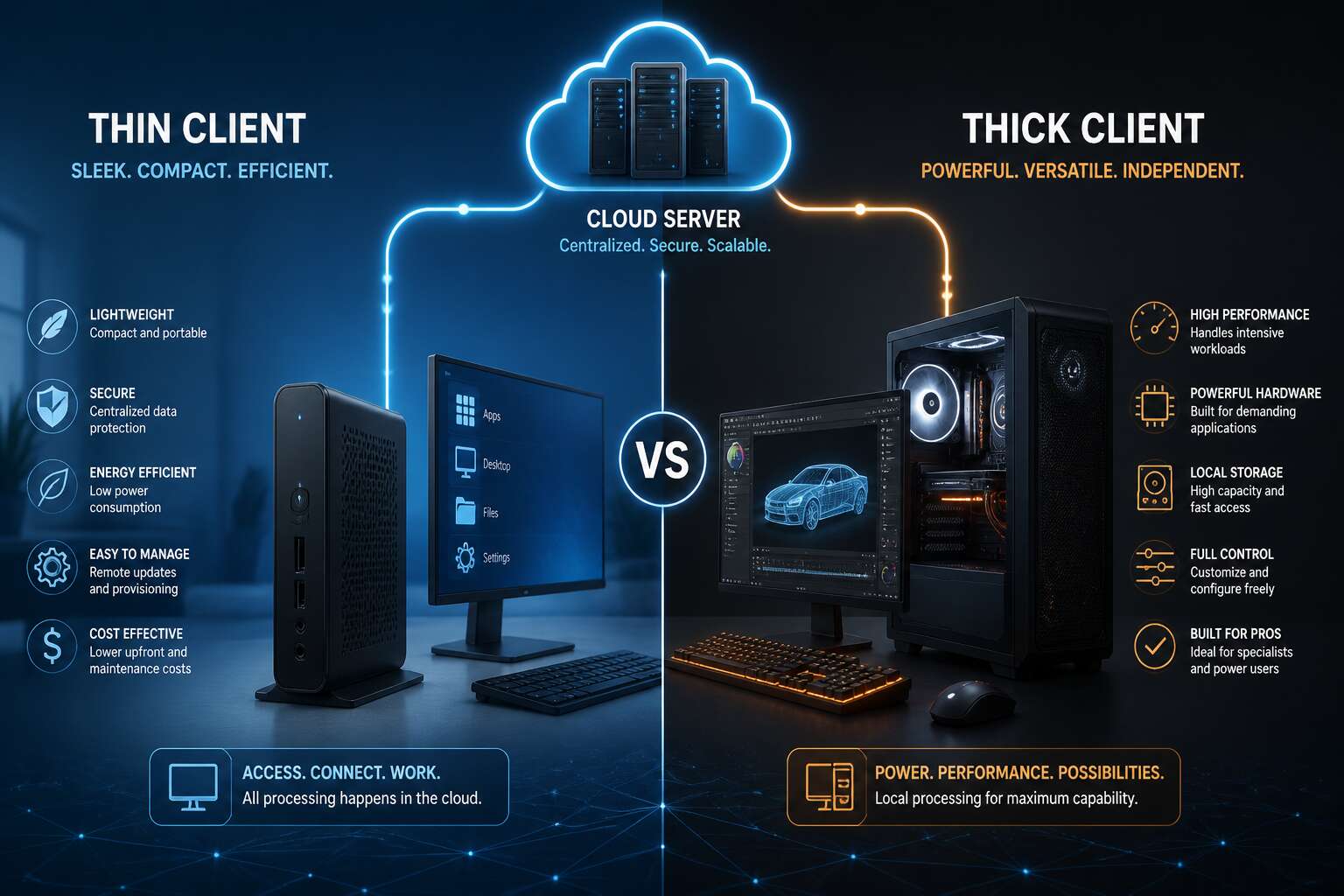
Let me demystify the thin client first. A thin client is a lightweight endpoint that delegates heavy lifting to a central server. It functions as a display terminal, sending keystrokes and mouse movements while receiving screen updates. The device itself houses minimal storage, often just a tiny flash drive for booting the operating system. There is no local hard drive holding applications or user files. The brain resides in the server room.
This architecture requires consistent network connectivity and a robust backend infrastructure. Without a responsive server, the experience becomes sluggish. However, the benefit is centralised management. Software updates, security patches, and application deployments occur once on the server, not across a fleet of devices. This is a significant advantage for organisations with distributed branches, particularly in regions like Gauteng or the Western Cape where IT resources are scarce.
– A small firmware footprint that reduces local security vulnerabilities.
– Passive cooling or minimal moving parts, which lowers power consumption.
– A connection broker that manages user sessions and resource allocation.
These devices typically utilise protocols like PCoIP or HDX to deliver the visual output. They are effective for task workers who rely on standard office suites or browser-based ERP systems. The operational model feels similar to a utility. You plug in, authenticate, and access a standardised environment. The physical device on your desk is almost irrelevant to the overall experience, which allows for hardware refreshes without disrupting user data.
Key Differences at a Glance
Here is the next section of your article.
South Africa’s network reality is the deciding factor in this architectural split. Fibre rollouts in major metros have improved, but latency and uptime remain variable, especially in areas like Mpumalanga or the Eastern Cape.
A thick client, often called a fat client, shoulders its own processing load. It runs applications locally using its own CPU, RAM, and storage. The server is used for file sharing or database access, but the user experience depends on the hardware sitting on the desk. This setup shines in environments where offline work is critical or where bandwidth is constrained. The trade-off is administration. Every single machine demands individual patching, antivirus updates, and configuration. That labour cost is a recurring burden.
The operational philosophies differ sharply. One model centralises risk and control, the other distributes both.
Here is the core distinction:
– Management: Thick clients require per-device maintenance; thin clients centralise updates at the server.
– Hardware lifecycle: Thick clients become obsolete as their local components age; thin clients extend usability because the server handles the upgrades.
– Resilience: Thick clients function during network outages; thin clients are unusable without a connection.
– Security: Thick clients store data locally, increasing breach risk if a device is stolen; thin clients keep data in the data centre.
The choice between thin clients and thick clients is not about which is objectively superior. It is about what your operational context demands.
When you select a thick client, you buy performance per seat. You also accept that maintenance scales linearly with headcount. A company with 500 employees in Sandton needs a dedicated desktop support team to manage the images, the software licences, and the inevitable hardware failures.
When you deploy thin clients, you bet on your infrastructure. The desktop experience becomes a function of your server room’s health. A failed switch or a congested WAN link brings productivity to a halt. But the efficiency gains in standardisation are undeniable. You manage a golden image, not a thousand fragmented hard drives.
Understanding these architectures is the first step, but the deeper issue lies in mapping your specific workloads to the right platform. Resource-heavy applications like CAD or video rendering are painful on a thin client unless you invest heavily in backend GPU virtualisation. Conversely, pure data entry and email handling waste the horsepower of a thick client. The underlying tension is a question of where you want your complexity to live: on the desk or in the rack.
Performance and Hardware Considerations
CPU and Memory Requirements
The brochure rarely tells the truth about CPU and memory in thin clients and thick clients. I have watched a 2GB thin client outperform a 4GB desktop because server capacity and network latency favoured it. In South Africa, power stability and bandwidth shape that reality as much as local processing capacity does.
Hardware choices should follow workload. For instance:
- A thin client with 2GB RAM manages email and documents; 4GB supports heavier multitasking.
- A thick client needs 8GB RAM for knowledge work and 16GB for local virtualisation.
- CPU headroom matters more than core count when local apps burst.
Storage Needs and Local Caching
Storage needs depend on which side of the thin clients and thick clients divide you sit. Thin clients ship with modest flash storage, sometimes 8GB or 16GB, because the server owns the heavy lifting. Local caching exists for one reason: to spare your patience when network latency spikes. You get a cached OS, some profile data, and little else. Thick clients demand proper drives, often 256GB or more, because local applications and virtual machines consume storage quickly. South African realities change the equation. Load shedding and unpredictable fibre make local caching on thin clients genuinely useful, yet it cannot replace a thick client’s storage when offline operation is non-negotiable.
Consider your own hoarding habits:
- Thin client: cached browser profiles and a slim OS.
- Thick client: offline mail archives, local VMs, bulky applications.
Network Dependence and Latency
Performance, in the world of thin clients and thick clients, is rarely an absolute measure. For the thin client, the network is the performance. A sluggish Wi-Fi link punishes every click, regardless of hardware. The thick client carries its performance with it. Local components set the pace; the network only asserts itself when you reach beyond the machine.
Hardware considerations follow a similar rhythm. Thin clients are compact, quiet, and unassuming. They break infrequently because they do so little. A thick client demands airflow, power, and occasional sympathy when its fan rattles. In my experience, neither choice spares you replacement costs, but the thin client’s bill is far smaller.
Network dependence separates thin clients and thick clients more than any spec sheet. Latency defines the thin client experience. A congested router, a flapping fibre link, or a peak-hour bottleneck all appear on screen as momentary delays. The thick client tolerates a bad connection with a shrug. It may lose the internet, but your documents remain open.
Graphics and Multimedia Handling
Graphics and multimedia tasks expose the real divide between thin clients and thick clients. A desktop with a dedicated GPU handles 4K timelines and complex CAD models without complaint. The thin client must compress and stream every frame across the wire, which taxes both the network and the server side. Simple video playback or a slideshow works fine. Interactive 3D work often fails entirely.
The hardware demands differ sharply between thin clients and thick clients:
– Thick clients need discrete GPUs for rendering tasks
– Thin clients rely on the host server’s graphics stack
– Local caching handles lightweight media, not raw editing workloads
That distinction matters for any office that produces visual content. Spreadsheets and documents run on either. The moment a user opens a video editor or a rendering engine, the thick client becomes the only practical option. For audio production, the story repeats: local processing keeps latency low, while thin clients introduce noticeable lag between input and playback. Multimedia work is fundamentally a local task, and no network tuning changes that reality.
Deployment and Management
Centralized vs. Distributed Management
South African IT teams know the pain of patching twenty desktops after hours. Thick clients demand hands-on attention at every endpoint, and the admin burden scales linearly with headcount. Each machine carries its own OS image, app versions, and security holes.
Thin clients flip that model. Your entire estate runs from a handful of servers, and centralised management becomes a single console. Updates deploy once and propagate everywhere!
- Patch deployment takes minutes, not weekends
- New user setups reduce to a profile assignment
- Troubleshooting happens server-side, not at the user’s desk
This is the real reason many organisations choose between thin clients and thick clients. The hardware matters less than the control plane. Distributed management remains viable for small teams, but it becomes a liability once you manage fleets across multiple sites.
Software Updates and Patch Strategies
Every software update carries risk. For thick clients, that risk repeats for each machine and each office. A missed patch becomes a vulnerability. A failed deployment becomes a support ticket.
Thin clients treat updates as a single event. The server holds the image, and the endpoint receives whatever is pushed. One confirmation sends a security patch to the entire fleet. No need to visit each device or trust that a remote user clicked restart. The strategy shifts from tracking individual machines to managing one source of truth.
Patch strategies follow the same logic:
- Stage updates in a sandbox environment before production
- Schedule deployment during off-peak hours across provinces
- Verify server-side logs to confirm every endpoint received the patch
This approach shrinks the gap between discovering a vulnerability and closing it. For South African teams managing fleets across multiple sites, that difference outweighs the hardware itself. The real decision comes down to managing a thousand separate machines or a single controlled environment. That is the core of thin clients and thick clients.
Security Implications and Data Protection
“83% of South African organisations experienced a security incident in the last year,” a recent report noted. This statistic underscores a grim reality: every endpoint is a potential gateway. With thick clients, each hard drive is a vault. If a laptop is stolen from a car in Sandton, the data on that drive is gone. Encryption helps, but the physical device is still a liability.
Deployment and management security implications change the calculus. You are not just managing hardware; you are managing risk. With thin clients, the absence of local storage storage is the security feature. There is no endpoint to lose. This approach centralises the threat model, giving you a single point of control. If a device is compromised, you reset the connection, not the machine.
Security measures become more precise with centralised infrastructure:
– Live USB ports can be disabled swiftly to prevent data theft.
– Peripheral access is managed from the server, not the device.
– Endpoint security policies are applied uniformly to the entire fleet.
Data protection for thin clients and thick clients ultimately becomes a question of custody. In a thick client world, you trust the user to safeguard the data. In a thin client world, the data never leaves the data centre. This is crucial for compliance with the Protection of Personal Information Act (POPIA). You reclaim the data narrative, ensuring that the information lives where you can see it, not scattered across a thousand desktops.
Scalability and Cost Efficiency
Scaling a thousand desktops is a logistical nightmare. I have watched IT teams spend weeks imaging hard drives for thick clients, only to discover each machine needs a manual update. The management gap between thin clients and thick clients becomes obvious the moment you add a second office. A thin client fleet can be provisioned from a single console, pushing identical configurations to every endpoint. Scalability shifts from hardware procurement to server capacity. Cost efficiency emerges through consolidation:
– Centralised monitoring reduces onsite visits.
– Per-device licensing fees often disappear.
– One administrator manages hundreds of endpoints.
Support tickets drop, power consumption falls, and the hardware lifecycle stretches further. For South African businesses, this transforms the total cost of ownership. You stop buying compute per desk and start buying it centrally.
Remote Access and Virtualization Integration
Somewhere between deployment and daily routine lies the real battlefield. I have witnessed a thick client rollout where every machine required a personal pilgrimage to the user’s desk. The IT team became cable whisperers, and one dedicated employee even named the various Ethernet ports. With thin clients and thick clients, the difference in operational overhead is stark. A thin client admin deploys a new application while sipping coffee from the server console.
For remote access, this becomes a matter of geography. The administrator manages hundreds of endpoints from a single web portal. These are the administrative tasks:
– Deploy Windows Server and VDI environments.
– Configure peripheral redirection.
– Assign direct or brokered connections.
Virtualization integration turns hardware into a policy decision. When a user in Durban logs in, their session exists on a server in Johannesburg. The central processing power does the heavy lifting. The local device simply displays the result. This configuration makes thin clients and thick clients fundamentally different tools. The thick client depends on its own silicon, while the thin client leverages the collective strength of the data center. For any South African operation with a latent internet connection, this architecture provides a practical answer to physical distance.
Use Cases and Business Applications
When Thin Clients Excel
In a Gauteng call center processing 50,000 interactions daily, a single hardware failure can cascade into long wait times. That is why the choice between thin clients and thick clients often comes down to your business’s tolerance for disruptions.
Thin clients excel in task based roles where users do not need local processing power. I have seen data entry teams, insurance claims processors, and warehouse management systems benefit from locked down endpoints. In South Africa, remote sites battle power fluctuations, so a thin client’s low power draw and centralized boot image reduce hardware tampering.
Common applications include:
- Franchise point of sale networks needing instant software updates
- Hospital admission desks requiring zero local data storage
- School computer labs that demand identical environments per learner
When reliable access to a shared application set is your core need, the simplicity of thin clients often outweighs the flexibility of thick clients, particularly for lean IT teams.
When Thick Clients Are Better
“Give me a machine that can actually handle this simulation, because this thin client just choked.” That is a sentence I have heard more than once in engineering firms and post-production houses across Johannesburg and Cape Town. For every use case where a locked down endpoint is perfect, there is a critical counterpart where raw, local muscle is non-negotiable. Thick clients are not just a preference here; they are a necessity for fluid performance.
The failure point for any centralized system is latency, and latency is the enemy of creativity and precision. When an architect in Durban is rotating a 3D BIM model with thousands of components, or a video editor is scrubbing through 4K footage in real time, sending every frame to a server and back is simply not viable. The human eye catches micro-stutters instantly, and those micro-stutters break the workflow. You need a substantial CPU and GPU housed right there on the desk, not in a rack miles away.
This is where the conversation shifts from hardware management to raw capability. Consider the specific roles where a thick client is the only sensible answer:
– CAD and 3D rendering workstations for civil engineering projects
– Audio production suites requiring real time plugin processing
– Financial trading desks where a millisecond of network delay is a financial loss
– Advanced data science teams running local model training on large datasets
The common thread is the need for immediate, uncompromised processing power. In these environments, the cost of the hardware is justified by the cost of time. While a thin client might be secure, it is useless if the user is staring at a loading spinner instead of working. The decision matrix for thin clients and thick clients is rarely about which is superior, but rather about where the bottleneck occurs: your network or your processor. If your bottleneck is the CPU, you need the thick client sitting right in front of the user, fully equipped to handle the load without asking for permission from a server.
Hybrid Approaches and Flexibility
Most South African businesses don’t need to choose one approach exclusively. A law firm in Sandton might run thin clients for document work while giving their litigation team full desktop workstations for heavy evidence software. That mix is practical, and I see it more often than you might expect.
The hybrid approach works because different roles have different demands. Consider how this plays out:
– A call centre uses thin clients for CRM access
– Data analysts get thick clients for local model training
– Branch offices run centralised systems, while head office keeps powerful workstations for creative work
This flexibility matters in South Africa where connectivity varies widely. A Cape Town office with fibre can rely on centralized systems. A remote mining operation in the Northern Cape needs local computing power to keep working during outages.
The real question is choosing between thin clients and thick clients based on what each role actually needs.
Industry-Specific Examples
South African healthcare shows why device choice matters. I see this split constantly in hospitals. A Johannesburg hospital runs patient records on thin clients and thick clients in the same building. Doctors view files through centralised terminals, while radiologists render 3D scans on powerful local workstations. The infrastructure adapts to the task, not the other way around.
Other industries follow similar patterns:
1. Accounting firms in Durban use thin clients for tax software access, reserving thick clients for complex audit modelling.
2. Retail chains in Pretoria place thin clients at checkout counters, while supply chain analysts rely on thick clients for forecasting.
3. Engineering consultancies in Cape Town run CAD on thick clients, keeping administrative staff on thin clients for email and documentation.
Making the Right Choice
Factors to Evaluate
Choosing between thin clients and thick clients often comes down to who sits at the keyboard. In South Africa, load shedding makes this a practical matter. A thin client with no live network is a paperweight. A thick client keeps working, at least until the battery drains.
Remember that thin clients and thick clients serve different temperaments. Some staff need full control to install tools and explore. Others only need a browser and a single business application. Placing the wrong model in front of them creates daily friction.
- Review the current infrastructure and the IT team’s capacity
- Compare network upgrade costs against hardware refresh cycles
- Estimate how quickly your user base will grow
Every environment carries its own constraints. The correct choice survives a Tuesday afternoon under real load, not a flawless demonstration.
Future Trends in Endpoint Computing
The future of endpoint computing is not choosing a single side but navigating a shifting landscape where the old boundaries blur. The security model is evolving rapidly. Centralized data promises control, yet edge processing offers speed. For many organisations, the decision now hinges on how artificial intelligence and machine learning will be deployed locally versus in the cloud.
As software becomes more intelligent, workloads will become more dynamic. This means the rigid definitions of thin clients and thick clients will fade, replaced by a spectrum of capability.
– The rise of 5G and cheaper bandwidth reduces latency penalties for thin models.
– New processors allow thick clients to run sophisticated local models for predictive tasks.
– Software licensing shifts toward per-user subscriptions, making device choice less cost-prohibitive.
These trends suggest a future where the choice is less about hardware and more about the specific digital experience each role requires. The winning strategy will be a fluid one, adapting endpoint power to the immediate task.
Expert Recommendations
In South Africa, a bad endpoint decision costs real productivity. Experts avoid picking sides. They recommend examining what workers actually do. Accountants may thrive on a thin client, while designers need the local muscle of a thick configuration. The market for thin clients and thick clients is a spectrum, not a binary. Consider these factors!
- Task complexity, specifically local processing needs
- Infrastructure resilience, from power to network
- User expectations, since some staff refuse remote desktops
Weigh these against your budget and existing infrastructure. The smartest South African firms are already mixing both endpoints to match each user’s reality.



0 Comments