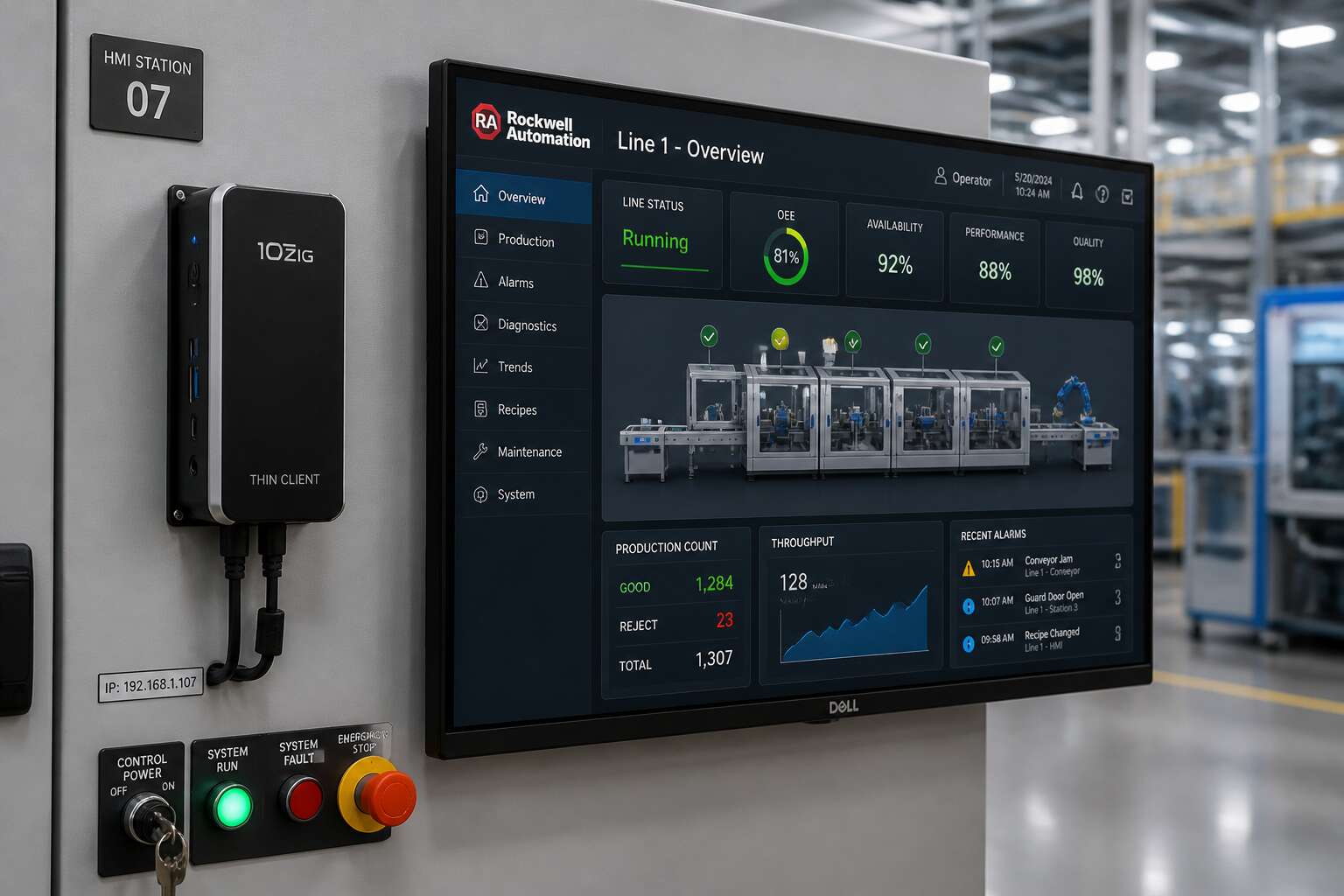
Understanding Thin Clients in Rockwell Automation Environments
Defining Thin Clients and Their Role in Industrial Automation
In a control room humming with Allen-Bradley controllers, the humble thin client often goes unnoticed. Yet these compact devices form the structural core of modern Rockwell automation setups. A thin client is essentially a terminal that relies on a central server. In a thin clients Rockwell environment, all processing happens remotely, storing nothing locally.
Consider how this architecture changes daily operations. I have seen facilities cut hardware costs by a third. For industrial automation, the design means consistent performance across every workstation. No bulky hard drives to fail on the shop floor. No rogue software installations. Just a clean, responsive interface.
- Centralized updates for Rockwell applications
- Reduced power consumption per node
- Instant failover to redundant servers
These advantages directly affect uptime. When your Johannesburg plant runs three shifts, thin clients Rockwell keep every screen synchronized. The role is simple, but the impact is profound.
How Thin Clients Integrate with Rockwell Software (FactoryTalk, Studio 5000)
Every mouse click on a FactoryTalk ViewSE screen travels to a server that may sit kilometres from the actual plant floor. The thin client at each station simply renders the result. I have watched operators in Gauteng control live processes through multiple thin clients Rockwell terminals without a hint of delay.
Studio 5000 accesses the same server. Engineers pull up controller logic remotely while project files remain locked in the data centre. Thin clients Rockwell architecture centralises every runtime, so FactoryTalk Activation Manager stays consistent and version control happens automatically.
- Display updates travel as lightweight protocol packets
- Controller communication happens once at the server
- Security layers apply only at the server endpoint
When a developer updates an application, every connected terminal sees the change at the next refresh. No one operates from an outdated screen.
Thin Clients vs. Traditional Industrial PCs: Key Differences
Walk onto any plant floor in Gauteng and you will still find traditional industrial PCs humming with local storage drives and fans that collect dust. They work, until they do not. A failed drive in an industrial PC means a trip to the site, a replacement unit, and hours of downtime. Thin clients rockwell systems eliminate that failure point.
The difference is not hardware size. It is where intelligence lives.
Traditional industrial PCs run applications locally. They need powerful processors, local licenses, and constant maintenance. Thin clients rockwell terminals run nothing locally. They simply present the interface delivered by the server.
- No local installation of FactoryTalk or Studio 5000
- No local data storage that can fail
- No local security patches to manage
I have seen engineers replace a faulty thin client rockwell unit in under five minutes, while the traditional industrial PC replacement took an entire shift.
Common Use Cases for Thin Clients Across Manufacturing Facilities
On a Hot Strip Mill in Vanderbijlpark, the difference between uptime and a stalled shift often comes down to how much intelligence sits on the floor. Thin clients rockwell systems operate as pure display terminals, pulling every screen and command from a centralised server. In Rockwell Automation environments, that means FactoryTalk View sessions and Studio 5000 interfaces render remotely, with no local executable or license file to corrupt.
Common use cases are straightforward:
- Operator HMI stations across multiple lines, where each unit costs a fraction of a full IPC.
- Maintenance terminals for fault diagnostics in remote zones.
- Batch control dashboards in dirty, high vibration areas.
I have seen plants run a dozen such terminals from one virtualised server, and the maintenance burden disappears overnight!
The Evolution of Thin Client Technology in Rockwell Deployments
Ten years ago, a Rockwell Automation shop floor meant a physical IPC beside every machine. The first thin clients rockwell engineers trialled were sluggish, and many doubted the architecture would hold up under the heat and vibration of plants like the Vanderbijlpark mill. Time proved the doubters wrong. As server hardware and network latency improved, those same display terminals began to outperform their bulkier predecessors.
The evolution is visible in how sessions are handled. Early units simply mirrored a desktop. Modern thin clients rockwell deployments push pixel-perfect FactoryTalk View screens without touching the license file. I have watched the shift from local processing to centralised orchestration change maintenance routines:
- Firmware updates now happen at the server level
- Replacement units rejoin the network and pull the same session
- Diagnostics occur without an electrician walking a kilometre of cable
Each step reduced downtime in environments where a stalled shift costs more than the hardware!
Critical Benefits of Deploying Thin Clients with Rockwell Solutions
Reducing Hardware Costs and Extending Equipment Lifecycles
In South African manufacturing, every rand spent on hardware is a rand not invested in production. Deploying thin clients rockwell changes this cost structure. Because processing happens on a central server, the endpoint itself demands far less computing power. That translates directly to lower acquisition costs and smaller replacement budgets.
- Reduced initial capital outlay per workstation
- Lower energy consumption from minimal components
- Fewer spare parts to stock for repairs
The lifecycle advantage is equally striking. Thin clients lack rotating drives and cooling fans, so they withstand the dusty, hot conditions common in many South African plants. A traditional PC might fail in three years, while a thin client can reliably operate for seven or more. That longevity means less frequent downtime and a slower equipment refresh cycle. I have watched that dynamic free up entire budgets for process improvements!
Centralized Management and Streamlined Software Updates for Rockwell Applications
A single engineer at a control room desk can update fifty Rockwell workstations in ten minutes without leaving the server room. That is the practical reality when thin clients rockwell become the standard. Centralized management turns every endpoint into a manageable node, not a separate computer that demands individual attention. Operators on the factory floor keep working while the server handles configuration changes, which matters in South African plants where shifts run around the clock.
The software update burden also collapses. Instead of walking from station to station with a USB stick or scheduling night maintenance, administrators push a single build to the central host. Rockwell applications such as FactoryTalk and Studio 5000 stay consistent across every thin client rockwell deployment, eliminating version drift that causes strange faults on the production line. Consider what this gives a maintenance team:
- Immediate rollback if a patch causes trouble
- Uniform runtime settings for every connected session
- Zero disruption to operators during update windows
That last point carries real weight. A traditional PC invites each user to install personal software, alter firewall settings, or update drivers, creating a chaotic mix of environments. Thin clients remove that variable entirely. The endpoint is a portal, nothing more. So the real work happens in one controlled place, and the shop floor stays stable.
Enhanced Security and Data Protection for OT Networks
Securing an OT network means controlling every entry point. Traditional PCs expand the attack surface with USB ports, local storage, and unmonitored software. Thin clients rockwell remove those variables. The endpoint has no hard drive, no peripheral bays, and no local admin rights. A compromised device yields nothing. It becomes a window into the session, not the system. That shifts the risk equation for South African plants dealing with load shedding and remote access pressure. Consider what disappears:
- Local malware persistence
- Unauthorized software installations
- Data extraction via removable media
What remains is a controlled, encrypted connection to the central host where Rockwell applications reside. OT network segmentation becomes straightforward because every thin client rockwell session terminates at the server. Security teams see one gateway, not dozens of unpredictable endpoints.
Improving System Reliability and Minimizing Downtime on the Plant Floor
Downtime on a plant floor is measured in lost tons, not lost minutes. Thin clients rockwell shrink the points of failure that traditional PCs carry into the production environment. No spinning hard drives. No local software that drifts out of sync. No user-installed utilities that quietly destabilise a running system.
Because each thin client rockwell session is rendered remotely, the hardware itself becomes almost disposable. When a unit fails, a worker swaps it in under five minutes. The session resumes exactly where it stopped. That is the difference between a brief pause and a full production stoppage.
- Instant replacement without imaging or configuration
- Consistent performance regardless of local hardware age
- Fewer thermal and mechanical failures on the floor
For South African operations already wrestling with load shedding, every reliable hour counts. Thin clients rockwell keep the interface alive while the controls remain safely hosted upstream, where power and compute are protected.
Energy Savings and Reduced Heat Generation in Control Rooms
In a control room, every watt that turns into heat is a watt wasted twice: once for power, again for cooling. Thin clients rockwell draw a fraction of the electricity that industrial PCs consume, and they release far less thermal energy. That difference becomes profound when multiplied across rows of operator stations!
Smaller cooling loads mean HVAC systems cycle less often, reducing mechanical stress and electrical draw. For South African plants, where summer heat and load shedding strain every system, trimming thermal output helps keep control rooms habitable and functional.
– Lower air conditioning demand, cutting both energy bills and maintenance calls
– Reduced heat buildup, protecting sensitive Rockwell components near operators
– Potential to downscale UPS sizing, since thin clients rockwell need less backup power
The savings compound monthly without losing any session continuity.
Implementation Strategies and Deployment Best Practices
Selecting the Right Thin Client Hardware for Rockwell Environments
Selecting hardware for a Rockwell environment starts on the plant floor, not in a catalogue. Vibration, ambient temperature, and panel depth all determine which thin clients rockwell installations can tolerate. I once watched a project stall because the team chose a sleek unit that could not handle the heat near a curing oven. The lesson: verify the industrial rating before approving any purchase.
For most thin clients rockwell deployments, the form factor matters as much as the processor. Panel mount units suit operator stations built into machinery, while DIN rail options fit existing electrical enclosures. A pilot deployment in one production cell exposes these practical differences before a full rollout.
Compare cabling requirements, spare parts availability, and peripheral connectivity. Hardware should disappear into the workflow.
Network Infrastructure Requirements for Seamless Performance
Deploying thin clients rockwell requires deliberate attention to network architecture. I have seen sound implementations falter when the OT network lacked dedicated VLANs or sufficient switch capacity. The client devices tolerate latency well, but the session hosting the Rockwell application does not.
Plan the rollout in phases, starting with a single cell or production line. Align the infrastructure with the plant’s existing segmentation strategy. Confirm that multicast traffic from FactoryTalk applications is properly isolated.
- Provision redundant switches for critical production areas.
- Set quality of service rules for HMI and historian traffic.
- Validate bandwidth against peak operator activity.
These steps allow thin clients rockwell deployments to operate without drawing attention to themselves, which is the best possible outcome in an industrial setting.
Virtualization Options: Citrix, VMware, and Microsoft RDS with Rockwell Software
Choosing the right virtualization platform for thin clients rockwell deployments depends on the plant’s existing ecosystem. VMware Horizon handles GPU intensive FactoryTalk View sessions well. Citrix Virtual Apps and Desktops excels with heterogeneous environments and remote access. Microsoft RDS offers the simplest path for smaller facilities already invested in Windows Server.
Consider the session count and operator tolerance for latency. Each platform requires dedicated configuration for Rockwell Software, particularly for licensing and USB redirection. I have seen plants assign different virtualization platforms by zone for thin clients rockwell:
- Start with a pilot cell to validate session stability.
- Assign the platform based on application criticality.
- Rehearse failover procedures before cutover.
Test the full suite before rollout, and confirm that FactoryTalk services survive a host reboot without manual intervention.
Planning a Phased Migration from Thick Clients to Thin Clients
Migrating an entire plant from thick clients to thin clients rockwell in a single weekend ignores the reality of South African production floors, where load shedding and shift changes already strain uptime. A phased migration respects those constraints.
Start with one cell or one line. Map which operators depend on which applications, then sequence the cutover around planned downtime. Keep a thick client available as a fallback until the new units have proven themselves.
- Inventory every HMI and its current network path.
- Document FactoryTalk service dependencies before decommissioning hardware.
- Validate each phase with a simple pass fail checklist.
Each phase must leave the system fully operational before the next begins. This isolates issues early and builds operator trust.
Configuration Best Practices for FactoryTalk View and Thin Manager
Most configuration errors on thin clients rockwell surface only after operators are already waiting on the plant floor. A deliberate setup of FactoryTalk View and Thin Manager prevents those moments.
FactoryTalk View applications must live on a central server, never on the local drive. That way every thin client renders the same runtime across shift changes. Thin Manager then becomes the command point. Use it to push display settings, network mappings, and access policies to groups of thin clients rockwell simultaneously. Always test configuration against a staging environment first.
- Keep FactoryTalk View runtime versions identical across all units.
- Assign static IP reservations to prevent session drops.
- Configure autostart for the View client, and verify session recovery after network interruptions.
Success here hinges on configuration discipline, not raw hardware.
Testing and Validation Before Full-Scale Deployment
Implementation strategies for thin clients rockwell deployments demand a testing phase that mirrors the plant floor’s harsh reality. I have seen clean configurations collapse under the weight of a single forgotten network rule. Pilot one production cell first! Load the FactoryTalk runtime, observe operator interaction through a complete shift, and document every anomaly.
Validation measures more than connection success. Network latency, reconnection time after outages, and display refresh under genuine load all matter. Build test matrices that map expected responses against observed behaviour. A staging environment catches these faults at low cost before operators ever wait at a frozen screen.
A phased rollout follows a deliberate sequence:
– Deploy to one zone, monitor for two weeks
– Confirm session recovery after unplugged network cables
– Verify thin clients rockwell handle power cycling without intervention
Each iteration tightens the configuration before the next wave begins. The data collected here decides whether the wider deployment proceeds or pauses.
Security and Compliance Considerations for Rockwell Thin Client Networks
Protecting Centralized Data and Intellectual Property
A single unpatched endpoint can undo years of OT security work. In Rockwell environments, thin clients rockwell architecture keeps automation data on central servers, not on the plant floor. This reduces the attack surface and simplifies audit trails.
Compliance requires more than firewalls. Teams must control who views process logic, recipe files, and production metrics. Thin clients enforce this by limiting local storage and USB access. For South African manufacturers, POPIA obligations add weight to these controls.
When every session runs through a central gateway, security patches apply once. There is no need to touch dozens of physical machines. That is how organisations protect intellectual property without slowing production.
Aligning with ISA/IEC 62443 and Other OT Security Standards
ISA/IEC 62443 forces a methodical review of what actually sits on the plant floor. Every device becomes a potential zone boundary, and every boundary needs a documented purpose. Deployments of thin clients rockwell fit this model because the endpoints hold no process data of their own. Their role is to display the central session, nothing more.
That simplicity changes how compliance evidence gets collected. Instead of chasing logs across dozens of industrial PCs, administrators review one consolidated record. For South African operations, where POPIA and sector regulators overlap, this concentration of audit data reduces the burden of proof.
A practical checklist emerges from 62443’s foundational requirements:
- Centralized authentication with no local accounts.
- Locked down peripherals and media ports.
- Recorded, replayable session histories for each user.
Environments using thin clients rockwell also simplify the zone model. The endpoint becomes a display appliance, not a data custodian. In our experience, that is the alignment auditors want to see.
Implementing Role-Based Access Controls and User Authentication
We have all watched someone with too much access turn a routine shift into a rescue operation. With thin clients rockwell, that problem loses its teeth. The server owns the authority, and each user gets a role that limits what they can actually see or change. No local accounts, no shared passwords taped to the monitor. Authentication becomes a matter of habit, not heroics.
Consider a typical plant floor. An operator logs in and sees only the screens their job demands. A maintenance tech gets session restart rights and diagnostic tools. An engineer can tweak recipes and logic. That is role-based access control doing its work, and it functions because the thin client offers no other way in. For a South African operation, this matters when an auditor asks who changed what and why. The session record ties every click to a named user, assuming the login step actually happened.
- Operator: view and acknowledge alarms
- Maintenance: restart sessions and diagnostics
- Engineer: modify recipes and control logic
So force the authentication. Badges, PINs, or both work fine. The point is that in a thin clients rockwell network, access is a permission, not a default. That is a small shift with a large compliance payoff.
Secure Remote Access for Off-Site Engineers and Support Teams
Remote support engineers do not need a doorway into the entire plant network. They need a keyhole. Secure remote access for off-site teams in a thin clients rockwell deployment turns that keyhole into a managed, auditable path.
Consider a South African site relying on a system integrator in Johannesburg or a vendor in another province. The thin client gives them a session, not a foothold. Through a hardened jump host, the engineer reaches only the required Rockwell application. Multi factor authentication gates the entry. Session recording logs every command. The shift leader can revoke access the moment the work ends.
Managing Firmware and Patch Updates Without Disrupting Production
Firmware updates expose the tension between security and uptime. In a thin clients rockwell deployment, a botched patch can freeze a control room. So we stage everything:
- Update a single test unit and watch it through a full production cycle.
- Roll out to a small group of non-critical stations.
- Push to the rest of the floor during a planned maintenance window.
The trick is knowing what changed. Many vendors release patches that address specific vulnerabilities. You don’t need to apply every update everywhere. Read the release notes. Compare against your actual exposure. If a patch doesn’t affect your operation, skip it until the next scheduled downtime.
Centralized management helps here. You can queue updates and push them overnight, with automatic rollback if something fails. That’s how you keep thin clients rockwell deployments patched without stopping production.
Total Cost of Ownership and ROI Analysis for Thin Clients in Rockwell Plants
Upfront Hardware and Licensing Costs vs. Traditional PCs
When plant managers see the quote for thin clients Rockwell systems, hardware looks affordable, but licensing costs often cause hesitation. That initial reaction misses a key point. In my experience with South African plants, total cost of ownership becomes clear over five years, not at purchase.
Thin clients usually carry lower upfront hardware prices than traditional PCs. Yet they require virtualization licensing, which adds a recurring fee. Traditional PCs include the OS and software, but they demand more maintenance, energy, and replacement cycles. Those hidden costs tilt the ROI calculation.
- Hardware acquisition: thin clients win per unit
- Licensing: subscription fees appear, but PC admin costs pile up
- Power and support: centralized management lowers yearly spend
Maintenance, Support, and IT Overhead Reductions
Plant managers often ask me whether thin clients rockwell configurations deliver real ROI after the licensing invoices land. My usual answer is that the comparison hinges on the maintenance ledger, not the initial quote.
A traditional PC costs more to run each year through image rebuilds, on-site fixes, and peripheral failures. A thin client shifts that work to a central server room. Your support team stops walking the plant floor with USB sticks.
– Less time spent on patch cycles
– Fewer spare units sitting on shelves
– Lower power draw per workstation
Those items show up in the monthly bottom line. Over a five year window, the overhead reduction often covers the virtualization fees. Plant managers I work with in Gauteng and Durban see the real return in their IT headcount allocation, not in the hardware price list. Support requests drop, and engineers focus on production data instead of desktop repairs. That is the quiet payoff of thin clients rockwell deployments.
Long-Term Scalability and Future-Proofing of Automation Infrastructure
Procurement teams in Gauteng often wince at the first invoice, but the real cost of thin clients rockwell deployments only reveals itself across the full ownership cycle. The five year model favours centralised computing because hardware refresh rates stretch from three years to seven or more. Licensing becomes predictable. Replacement units cost a fraction of a full IPC. That arithmetic matters when capital budgets face scrutiny in South African manufacturing.
Scalability follows the same curve. Adding an operator station means deploying another thin client, not another FactoryTalk installation. The server room absorbs the load. Future Rockwell software versions run on the same physical endpoints because processing happens centrally. That is the long term advantage no quote sheet shows.
- Hardware refresh cycles extend measurably.
- Software upgrades avoid per workstation upgrades.
- Production line expansion avoids new IPC purchases.
For operations planning around thin clients rockwell, the total cost curve bends downward while capability rises.
Quantifying Savings from Reduced Energy Consumption and Extended Lifespan
An operator station running a traditional IPC can draw ten times the power of thin clients rockwell deployments. Over five years, across thirty stations, that difference compounds into real rands on Eskom’s bill. The energy savings alone often justify the migration before uptime improvements are even counted.
The extended lifespan of thin clients rockwell deployments changes the ROI equation further. With no moving parts, no fans, no local storage to corrupt, these endpoints routinely operate past the seven year mark. An IPC is typically replaced at least once in the same period. Each replacement carries hardware cost, configuration hours, and production interruption.
The financial model is straightforward:
- Energy draw reduced from roughly 100 watts to 10 watts per station.
- Replacement frequency reduced by half or more.
- Each new operator station added for a fraction of a full IPC cost.
Those figures hold up in any finance review.
Hidden Costs and Pitfalls to Avoid in Thin Client Projects
Total cost of ownership for thin clients rockwell deployments extends past the purchase order. The real figure emerges in the infrastructure that supports them. Network switches, server capacity, and virtualisation licences carry their own weight. A plant that plans for these from the outset avoids a second budget cycle. The server room becomes the new critical path, and reliability shifts from the endpoint to the hypervisor.
- Switch upgrades for the new network segment
- Virtualisation host capacity and licences
- Reconfiguration hours for FactoryTalk View
Hidden costs surface in the peripheral work. Cable runs for the new topology, time spent reconfiguring tags, and operator training all consume hours. The pitfalls are not technical. They are planning failures. Teams that assume a smooth migration discover the difference only after commissioning begins. A year later, the maintenance ledger confirms the projection.
Overcoming Common Challenges and Troubleshooting Thin Client Deployments
Addressing Latency and Performance Bottlenecks in Rockwell Applications
A 200 millisecond delay on a FactoryTalk View screen will make an operator question the entire production line. Latency in thin clients Rockwell deployments rarely stems from the endpoint hardware. It usually lives in the network infrastructure between the device and the virtualised application.
I have traced performance bottlenecks to switch port misconfigurations, jumbo frame mismatches, and a single faulty cable run spanning 60 metres across a plant floor. The thin client is often the last component to blame.
- Measure round trip time between endpoint and host during peak production shifts.
- Verify QoS policies are applied to the Rockwell traffic class.
- Confirm the virtual machine is not exhausting CPU or memory capacity.
These checks isolate the bottleneck quickly. Once resolved, screen refreshes and tag updates return to acceptable speeds.
Compatibility Issues with Legacy PLCs and Older FactoryTalk Versions
Legacy PLCs do not always cooperate with modern virtualisation layers. A SLC 500 or PLC-5 speaking DH+ or serial DF1 will not appear in FactoryTalk Linx unless the correct driver is installed and licensed on the host. I have watched teams blame thin clients rockwell for a missing tag database, when the real fault was a FactoryTalk Directory pointing at the wrong version.
- Confirm the FactoryTalk Linx driver version matches the legacy PLC protocol.
- Validate the FactoryTalk View Studio version against the runtime on the host.
- Test tag reads directly on the server, bypassing the thin client entirely.
Once those match, older FactoryTalk applications display without fault. The thin client remains a pass-through, and that is all it should be.
Dealing with Network Outages and Failover Strategies
Network outages expose the character of a thin client deployment. When the session drops, the console freezes mid-scan. The panic starts with a call to IT, but the root cause sits in an unexamined switch port or a misconfigured redundancy path. For thin clients rockwell environments, treat the network as part of the control system, not a utility.
Failover strategies demand deliberate testing. A wireless bridge that works during commissioning can fail during shift change. Define the recovery sequence before you need it.
- Verify FactoryTalk services restart cleanly after an interruption.
- Test the secondary path under load, not idle.
- Document the expected reconnect time for each station.
When the network fails, the thin client should re-establish the session without human intervention. That requires the server to hold the session state while the client waits. The operator should see a pause, the same screen they left, never a blue screen.
Managing Vendor Support and Rockwell Certification Requirements
Vendor support often separates smooth deployments from stalled ones. When a thin clients rockwell issue surfaces, the first question is who owns the fix. For thin clients rockwell deployments, certification matters because unapproved hardware can invalidate FactoryTalk assumptions. The integration layer, the server hypervisor, the endpoint firmware, each demands a clear escalation path.
- Confirm every thin client model appears on Rockwell’s tested hardware list.
- Document the support contract terms for both the thin client vendor and your Rockwell partner.
- Test patches in a staging environment before touching production.
A common troubleshooting misstep is assuming the session server is the culprit when the problem hides in client-side configuration. Session reliability, audio mapping, USB redirection, these settings vary across firmware revisions. Keep the inventory updated and track which version runs on each station. That turns a frantic diagnosis into a quick reference check.
Real-World Lessons Learned from Manufacturing IT Professionals
Half of the thin clients rockwell troubleshooting calls I receive start with a firmware version check. That lesson echoes across plant floors. Engineers chase session server issues while the real problem hides in client-side settings. Audio mapping, USB redirection, and session reliability behave differently across firmware revisions. A station that worked for months can fail after a routine patch. The Rockwell environment rarely changes, but the thin client does.
For thin clients rockwell deployments, we started documenting every endpoint with its exact Build and FactoryTalk View client version. That habit turned frantic diagnosis into a quick reference check. Real deployments taught us to stage changes. Pushing firmware directly to the plant floor invites trouble. Test on one station first.
Another practical lesson is to keep a spare thin client on the shelf. Swapping a suspected unit takes minutes, while isolating a network fault takes hours.
Future Trends and Innovations in Thin Client Technology for Rockwell Automation
The Rise of Cloud-Based HMI/SCADA Solutions and Their Impact on Thin Clients
Cloud based HMI and SCADA platforms are easing thin clients rockwell into a strange new role. The endpoint becomes a portal to software living in someone else’s data centre. South African plants with flaky connectivity should take note!
The architecture shifts toward hybrid models. Some visualisations stay local, others stream from the cloud. FactoryTalk deployments now carry bandwidth constraints as binding as their CPU load. I have seen teams underestimate this change.
Hardware planners face a different set of trade-offs:
- Local processing demands shrink
- Bandwidth requirements grow
- Redundancy becomes a network conversation
The certified endpoints handle the transition quietly. The disruption lives upstream, where engineers trade processor cycles for latency budgets.
Edge Computing vs. Centralized Virtualization: Finding the Right Balance
Edge computing and centralized virtualization are no longer opposing camps. They are becoming a spectrum. For thin clients rockwell, the future lies in dynamic workload shifting. A control room might run FactoryTalk View locally during a network hiccup, then stream from the cloud once latency stabilises. I expect thin clients to gain embedded models that predict network quality before switching.
Here are three innovations worth tracking:
- Client side AI for anomaly detection in HMI data, reducing cloud round trips.
- Adaptive rendering protocols that adjust resolution based on available bandwidth.
- Confederated management dashboards that orchestrate both local and remote endpoints.
The balance is not static. South African plants with flaky connectivity will lean on edge first, while central teams use virtualization for audits and backups. The certified endpoint simply adjusts.
AI-Driven Predictive Maintenance Integrated with Thin Client Infrastructure
The emerging focus of industrial computing is AI-driven predictive maintenance integrated with thin client infrastructure. Across South African plants, thin clients rockwell deployments capture HMI interaction data and control system telemetry without overloading the network. Local inference on the endpoint detects subtle deviations before they escalate into costly failures.
This setup creates immediate opportunities:
– Continuous vibration analysis on connected machinery through FactoryTalk analytics
– Automated diagnostic logging directly from operator stations
– Real-time anomaly scoring distributed across every certified endpoint
The thin client now functions as an active data node feeding predictive models directly from the operator station. Rockwell environments benefit because centralized architecture keeps software updates manageable while edge intelligence stays responsive on saturated networks. That combination matters for remote mining sites and rural processing facilities across South Africa.
Advances in Hardware: Zero Clients, Ruggedized Devices, and Power over Ethernet
New hardware is changing what a thin client can survive. Zero clients now strip the operating system down to firmware, which means less to patch and fewer failure points on a Rockwell network. Ruggedized units with wide temperature tolerances handle the dust and heat of South African plants without air-conditioned enclosures. Power over Ethernet removes the separate power supply, so a single cable delivers data and electricity to each operator station. This simplifies installation on existing factory floors and cuts the labour cost of new runs.
The practical gains for thin clients rockwell deployments include:
- Lower power consumption per station, especially in remote areas with unstable grid supply
- Reduced cabling costs when retrofitting older control rooms
- Longer service intervals because there is no cooling fan or spinning drive
These hardware upgrades turn the thin client into a rugged network device rather than a desktop substitute. For thin clients rockwell users, the endpoint can now be mounted closer to the machinery it monitors, without sacrificing uptime. That practical shift matters on plants where vibration, heat, and dust used to force expensive protective enclosures.


0 Comments